Reverse Calculation
You can perform a reverse calculation to determine one of the transmission line parameters (along with secondary parameters) for a specific target characteristic impedance or differential characteristic impedance. Reverse calculations are available for any transmission line model.
Examples
Reverse Calculation Walkthrough
To perform a reverse calculation, follow these steps:
-
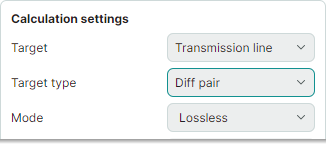
Set the initial calculation settings as shown below:
- Set Target to
Transmission line - Set Target type to
Single-ended,Diff pair,Coplanar single-ended, orCoplanar diff pair - Set Mode to
Lossless
- Set Target to
-
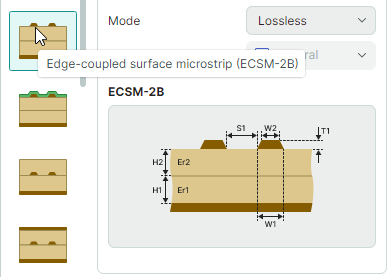
Select the required transmission line model and review it in the preview area.
-
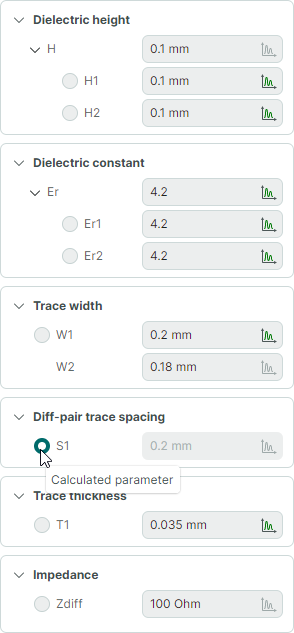
Choose the parameter you want to calculate by selecting the radio button next to it. Define other transmission line input parameters, including the target characteristic impedance value.
-
Click Calculate in the lower-right corner of the calculation tab to run the calculation.

Before running the calculation, you can click the dropdown arrow next to the Calculate button to choose between two calculation saving options:
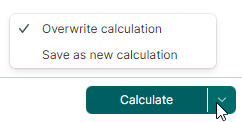
- Overwrite calculation – Saves the modified input parameters to the current calculation, overwriting previous data.
- Save as new calculation – Saves the modified input parameters to a new calculation. This calculation will appear in the Projects panel.
Calculation Results
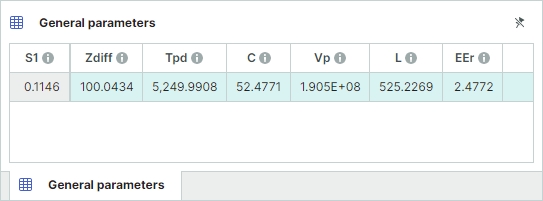
You can view the calculation results in the table at the bottom of the tab. The first column in this table displays the target calculated parameter.
See Also