Manage Projects and Calculations
The Projects panel displays loaded SimPCB Lite projects. It allows you to create and manage projects, models, and calculations. You can optionally create groups within a project to combine individual models.
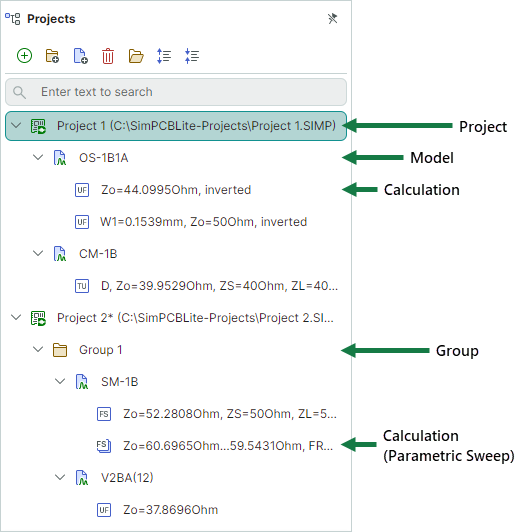
 Project – A single unit (*.SIMP file) that contains models (structures) and calculations.
  Group – An optional folder to combine models according to your logic.
 Model – A model (structure) of a transmission line or via.
- Calculation – A calculation performed on a model using specified input data. It defines calculation input parameters, as well as result presentation settings. Each calculation type has its own icon.
Toolbar
The toolbar at the top of the Projects panel contains commands to add, remove, and collapse/expand project items.

 – Adds a new project.
 – Adds a new group.
 – Adds a new calculation.
  – Deletes the selected item (project, group, model, or calculation).
 – Loads an existing project using an Open File dialog.
 – Expands all items.
 – Collapses all items.
Context Menu
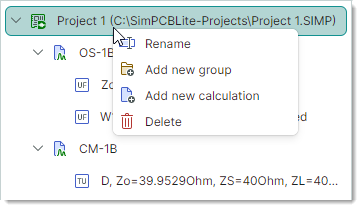
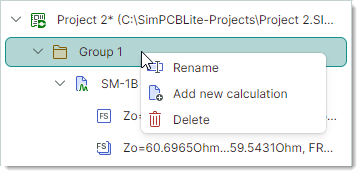
You can also manage project items using context menus. Each project item has its own context menu.
-
A project's context menu
-
A group's context menu
-
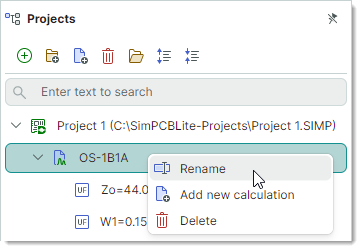
A model's context menu
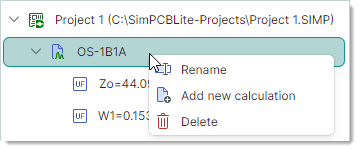
-
A calculation's context menu
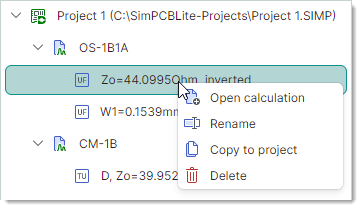
Built-in Item Search
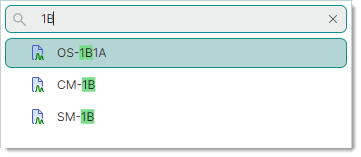
The Projects panel contains a search box which allows you to locate items by name. To search for an item, type a string that the item's name contains. The matches will be displayed, while other items are hidden.
Rename Items
To rename an item, you can do one of the following:
- Select the item (for instance, by a mouse click), and then press F2, or click the item again.
-
Right-click the item, and select Rename from the context menu.